
Fake Outage Emails Are Copying Microsoft 365
Scammers sent fake Microsoft 365 outage alerts the day after a real outage. Here's how the campaign worked and what SaaS teams can do before their next incident.
For software and SaaS companies, an outage is already a bad day. Support tickets pile up, the status page gets refreshed every 30 seconds and someone on social media is very upset about it. What doesn't always get thought about is that an outage is also the moment your customers are most likely to believe an urgent email about your service.
Think about it from the other side. Your email's been playing up all morning, everyone in the office is complaining, and then a message lands saying a few of your emails got stuck and will be deleted unless you restore them. You'd probably click it. Most people would, and that's the whole idea.
What Happened
On November 13, Microsoft Threat Intelligence spotted a high-volume phishing campaign pretending to be Microsoft 365 service notifications, sent to organizations across a range of industries worldwide. The timing wasn't random. It followed a real Exchange Online incident on November 12, so plenty of people had genuinely had trouble with their email the day before (including us).
The emails came from senders with names like "Outage Notification" and "Service Health", with subject lines starting with "Outage" followed by a jumble of characters. The sample Microsoft shared said four messages had been held during the disruption and would be deleted within 24 hours unless you clicked a big "RESTORE MESSAGES" button. Outlook, Teams, SharePoint and Copilot all got a mention too (nothing says legitimate like a few product names).
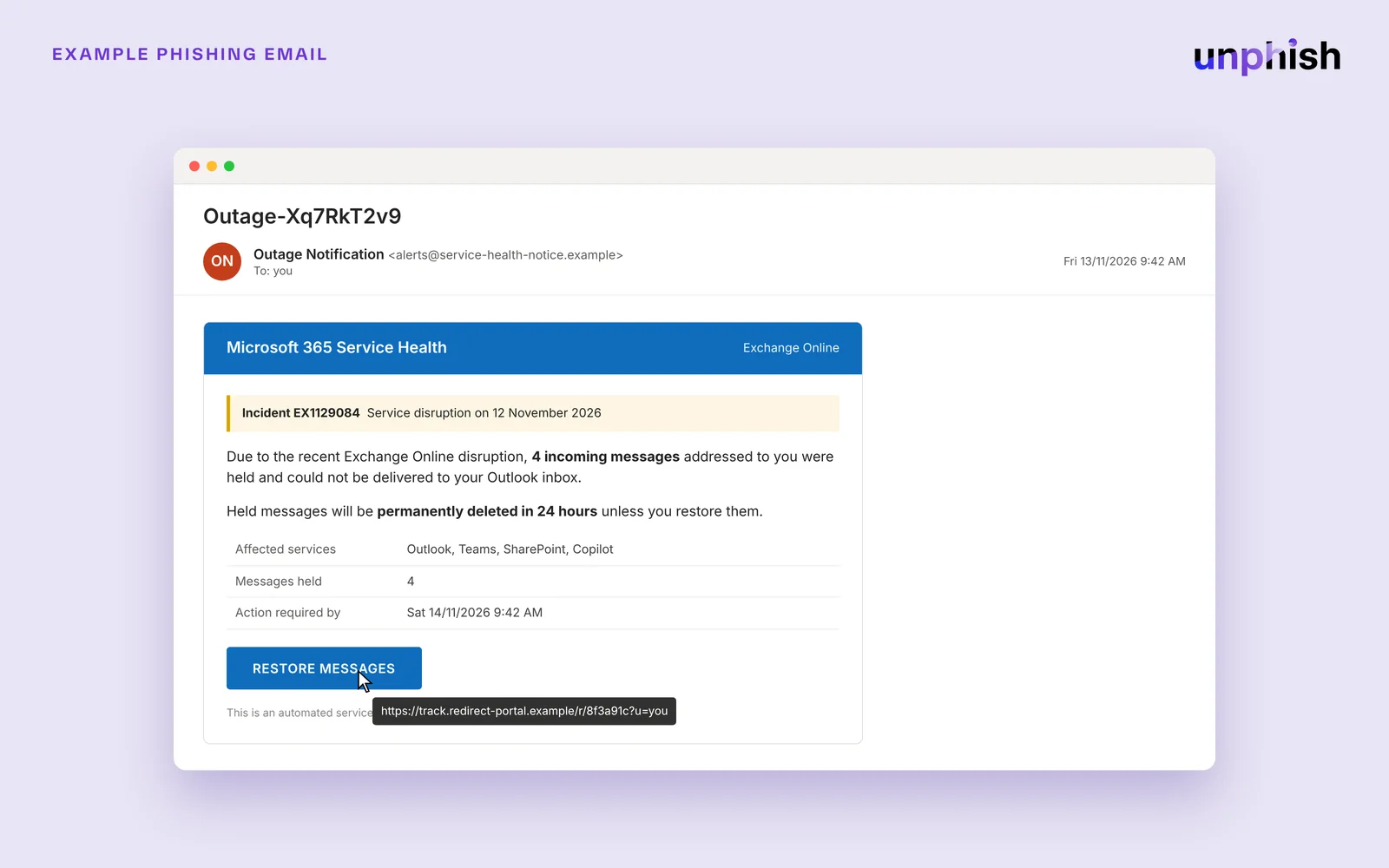
The links went through tracking URLs that redirected to websites with nothing to do with Microsoft, and the goal appears to be stealing login details. Microsoft says it hasn't seen evidence that credentials were actually captured, and the emails were being blocked for organizations using Defender for Office 365. Not every organization has that though, and the people behind these campaigns only need a handful of clicks to make it worth their while.
Why Outages Work So Well
Most phishing has to invent a problem. This one didn't need to. The outage was real, people had already noticed it, and so an email about it felt expected rather than suspicious. Put a 24-hour deadline on top and the worry of losing emails you didn't even know about, and it's not hard to see why someone might click first and think later.
It also lands when IT teams are at their busiest. During an outage, an email that looks like it came from the vendor doesn't stand out. If anything, it looks like the vendor is doing its job.
If you're on the receiving end, the giveaways are the usual ones. They're just easier to miss when you're stressed. The sender's address won't be a Microsoft one, hovering over the link shows it going somewhere else entirely, and a real provider isn't going to threaten to delete your emails in 24 hours. Microsoft's advice is to check service issues in the Microsoft 365 admin center rather than clicking anything in an email, which is good advice for pretty much any platform you use.
It Isn't Just a Microsoft Problem
Microsoft gets copied more than almost anyone (it's the login half the working world uses, so of course it does). But the same trick works on any SaaS brand with a status page and customers who rely on it. If your platform goes down, someone can register a lookalike domain, put up a fake login page and email your customers while the outage is still being talked about. Fake support accounts on social media are another favourite, replying to customers who are complaining publicly and offering to "help".
Phishing is already one of the most reported scams around. In Australia, the National Anti-Scam Centre recorded 65,361 phishing reports and $97.6 million in losses in 2025, in the US the FBI's IC3 received 191,561 phishing and spoofing complaints, and in the UK, UK Finance reports criminals stole almost £1.3 billion through fraud over the same year. A lot of those start with a brand people trust, and an outage gives that brand a very believable reason to be in their inbox.
What SaaS Teams Can Do
Stop Outage Phishing with Unphish
Unphish is a threat detection and disruption platform built to identify and take down phishing, scams and brand impersonation. We monitor for lookalike domains, cloned login pages, fake support accounts and fraudulent ads using your brand, then handle the takedown with the registrar, host or platform. So when your service has a bad day, scammers don't get to make it worse.
Learn more about phishing protection or book a personalized platform demonstration.